Login & setup
Login page, first-run configuration and a personal account for every user.
A check-in kiosk at the door, a management app in the HR office: two Windows apps, one clear view of your team.
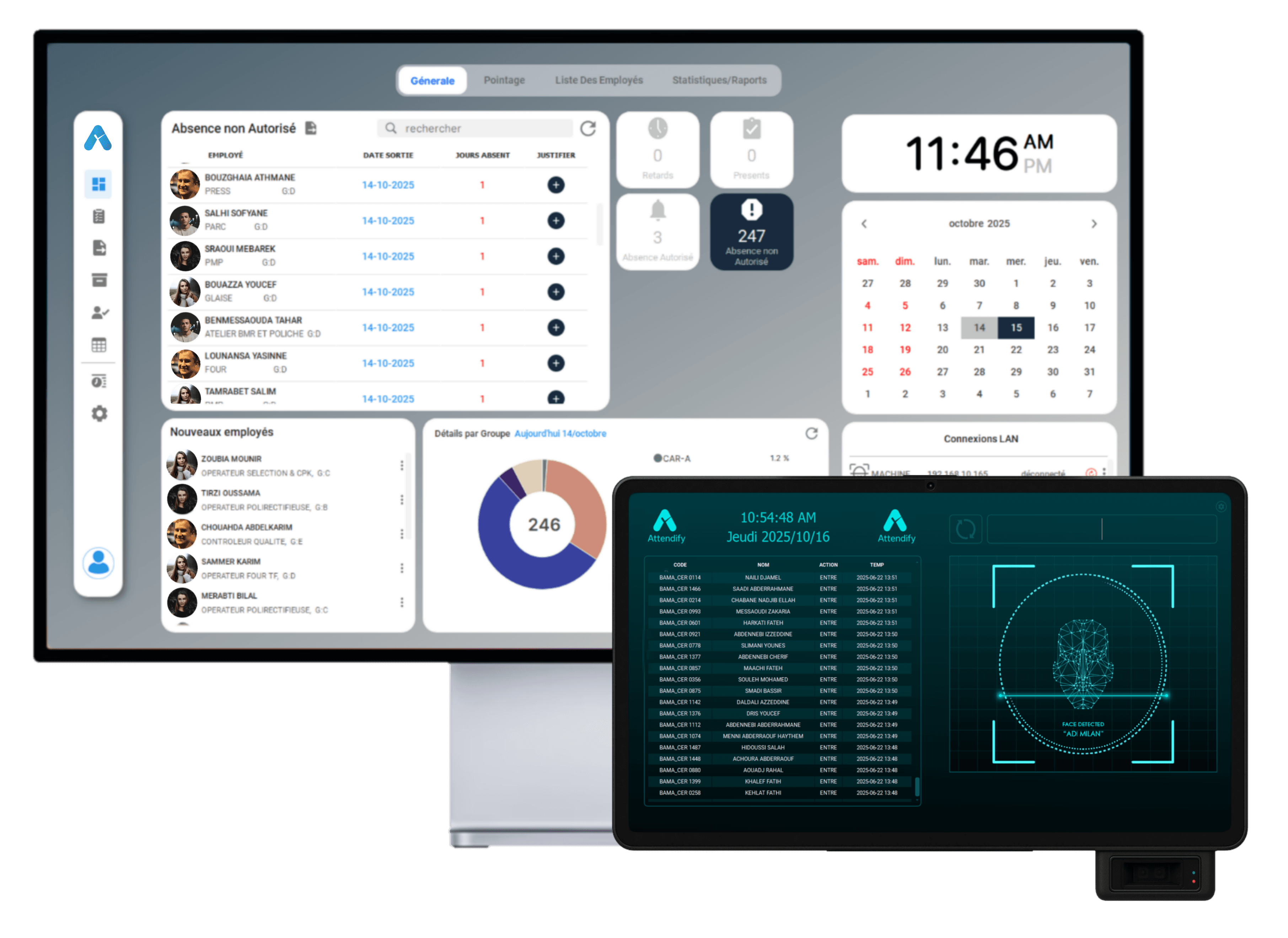

Employees punch at the kiosk, HR runs everything from the office.
Installed on a tablet at the door. Employees clock in and out and receive calls.
The HR workstation: punches, absences, calls, statistics, reports and access rights.
Payroll, check-in for remote sites (factory in one city, administration in another) and modules adapted to your organization.
Install the check-in app on a Windows tablet.
Create profiles, groups, departments and schedules.
Punches reach the dashboard instantly.
Filter by category and see what each module does.
Login page, first-run configuration and a personal account for every user.
Absences, delays, present staff, new hires, clock, calendar and connected kiosks.
Every in/out punch with search, filters, and manual add or edit.
A side panel with punches, absences and justifications of the selected employee.
Call an employee: the call shows at their next punch, questionnaires included.
Archive and restore employees with tables, search and management screens.
Manage work schedules and track absence justifications.
Define roles and fine-grained permissions for every user.
Export punches using your filters, ready for payroll.
Excused vs unexcused absences, filtered by group, department, job title or custom pick.
Irregular punch, off-schedule work, overtime, call seen or not.
Audit log of adds, edits and deletes, visible to privileged users only.
One place to configure every module of the application.
7 reports exportable to PDF: calls, questionnaires, absences, delays and more.
Design badges and drag fields onto your imported PDF templates.
Excused
Unexcused
Export in one click, or upload your own PDF template and drag and drop the data fields exactly where you want them.
Upload your template and place each field where you want it.
Drag fields onto the badge.
Every action is logged, every right is controlled.
Define who can view, edit or delete.
| Add | Edit | Delete | |
|---|---|---|---|
| Administrator | |||
| HR | – | ||
| Supervisor | – | – |
Every add, edit or delete of an attendance punch (in / out) is recorded, with search and date range.
Archive without losing history.
One-time payment, no subscription
For small businesses
For growing teams
For large and multi-site organizations
“Attendify saves us hours of data entry every week.”
A time-and-attendance system made of two Windows applications: a check-in kiosk and a management app.
The check-in app installed at the door, and the management app installed in the HR office.
Windows 10 and Windows 11 (to be confirmed for your release).
A Windows tablet or PC mounted at the entrance, preferably with a touch screen.
Daily use runs on your local network. Internet is only needed for updates.
Admins call an employee; the call appears at their next punch, with an optional questionnaire.
Yes, work schedules feed the lateness and off-schedule alerts.
Through the justification module: each absence can be justified and tracked, and statistics separate them.
Yes, each user gets precise privileges; the audit log is limited to authorized profiles.
Departed employees are archived and can be restored anytime, with their history intact.
Punch export and 7 PDF reports using your own templates.
Access is role-controlled and every operation is logged. Plan regular backups.
The website is available in French, Arabic and English.
Yes, a 14-day free trial: try the system before you buy.
A one-time lifetime license: Standard, Pro or Enterprise depending on your size. Contact us for customization.
By phone, WhatsApp or email, Sunday to Thursday.
Join the leading companies managing the attendance of hundreds of employees with Attendify — streamline your workforce management and boost productivity.
0797 05 75 98 · WhatsApp